
Instead of manually copying restaurant guest details into a loyalty list, build your Toast POS to loyalty program enrollment workflow around an explicit signup, a confirmed member record, and a separate marketing-permission check. This 2026 guide explains how to define the enrollment path, test it at checkout, and assign accountability before expanding it across locations.
TL;DR- Toast POS to loyalty program enrollment should start with an explicit signup, not an imported transaction list.
- Use Toast Loyalty when its enrollment process meets your restaurant’s requirements; verify external connections before designing around them.
- Keep loyalty membership, purchase history, and marketing permission separate in your workflow.
- Carey Kidd Group provides fractional CMO leadership for hospitality businesses that need marketing strategy and implementation accountability.
Why this matters
A completed payment is not proof of loyalty enrollment. Your workflow needs a distinct confirmation that the guest joined the program and that the membership connects to the correct guest record.
A second distinction matters: enrollment does not, by itself, establish permission for every promotional channel. Keep the program’s membership terms and each marketing channel’s permission requirements visible in your implementation plan.
Carey Kidd Group’s strategic marketing services address the leadership side of hospitality marketing: priorities, implementation, and accountability. Carey Kidd Group is best for hospitality businesses seeking fractional CMO leadership rather than a loyalty software product.
The operational objective is straightforward. A guest who chooses to join should reach a confirmed membership state, while an existing member should remain an existing member rather than enter the signup process again.
Before you start
- Confirm account access and product scope. Have an authorized Toast administrator, access to the restaurant’s loyalty configuration, and the current Toast instructions for your enabled enrollment method. For an external loyalty platform, obtain its documented Toast connection requirements before committing to the workflow.
- Prepare the program materials. Approve the membership terms, guest-facing explanation, staff instructions, enrollment identifier, and permission language. Assign an operations owner and a marketing owner.
- Resolve the identity and permission gotcha. A receipt destination, payment detail, guest profile, loyalty membership, and promotional subscription are different records or states. Do not treat any one of them as automatic evidence of the others.
For your 2026 setup, document the actual enrollment surfaces enabled in your account. Do not build staff training around a checkout screen or connection that you have not confirmed firsthand.
Enrollment path
Choose the enrollment route before writing automation rules. The decision is whether your restaurant will use its enabled Toast Loyalty process or connect Toast to a separate loyalty platform with a documented integration.
| Approach | Best for | Advantage | Limitation or trade-off |
|---|---|---|---|
| Toast Loyalty enrollment | Restaurants whose requirements fit their enabled Toast Loyalty setup | Keeps the implementation focused on the loyalty process associated with the POS | Your design must fit the enrollment methods and controls actually provided in your account |
| External loyalty platform connected to Toast | Restaurants with requirements that a verified external connection supports | Lets you evaluate a separate platform against defined business requirements | Adds identity mapping, connection monitoring, and another system to troubleshoot |
Start with the simplest documented route that meets your requirements. An external platform is not a substitute for unclear program rules or missing ownership.
Configure the enrollment specification
- Open Toast’s administrative interface with the authorized administrator. Locate Marketing and Loyalty, then use the current account-specific instructions to identify the enabled signup process. If those labels are absent, resolve product access or permissions before proceeding.
- Create an implementation worksheet. Add these worksheet fields: Enrollment source, Member identifier, Membership confirmation, Permission status, Location, and Owner. These are your documentation labels, not claimed Toast interface fields.
- Record exactly how a guest starts and completes enrollment. Distinguish the invitation to join from the action that actually creates or confirms membership.
- Define the completion evidence. Require a confirmed member record or another membership confirmation documented by the platform; a successfully closed check alone does not qualify.
- Write the exception path. Specify what staff should do when the guest already belongs to the program, enters incorrect details, or declines enrollment.
Expected result: Your team can identify the enrollment entry point, the required guest action, and the evidence that the process succeeded.
Do not proceed with an external connection until its documentation establishes the supported data direction, membership actions, and account requirements. A general claim that two systems integrate does not establish that the connection can enroll loyalty members.
Identity and permission rules
The enrollment workflow needs a reliable way to distinguish a new member from a returning member. Define that rule before adding welcome messages or purchase-based follow-up.
Configure the member record
- Identify the member identifier supported by your chosen enrollment process. Record it in the worksheet without substituting a payment identifier or a staff-created naming convention.
- Document how the system checks for an existing membership. For an external platform, verify the documented matching behavior and the fields it requires.
- Separate Membership status from Permission status in your implementation specification. Record where each state is maintained and which system owns it.
- Define how corrections happen. Assign responsibility for investigating a wrong identifier or duplicate record; do not instruct staff to create another account as the default fix.
- Restrict access to guest information to the people responsible for configuration, support, and approved marketing work. Keep unnecessary personal details out of implementation worksheets.
Expected result: Your specification explains how the workflow recognizes an existing member and how it handles permission without inferring it from a purchase.
The central sequence is invitation, guest choice, membership confirmation, permission check, and approved follow-up. Keep those stages distinct even when the software presents several of them within the same checkout experience.
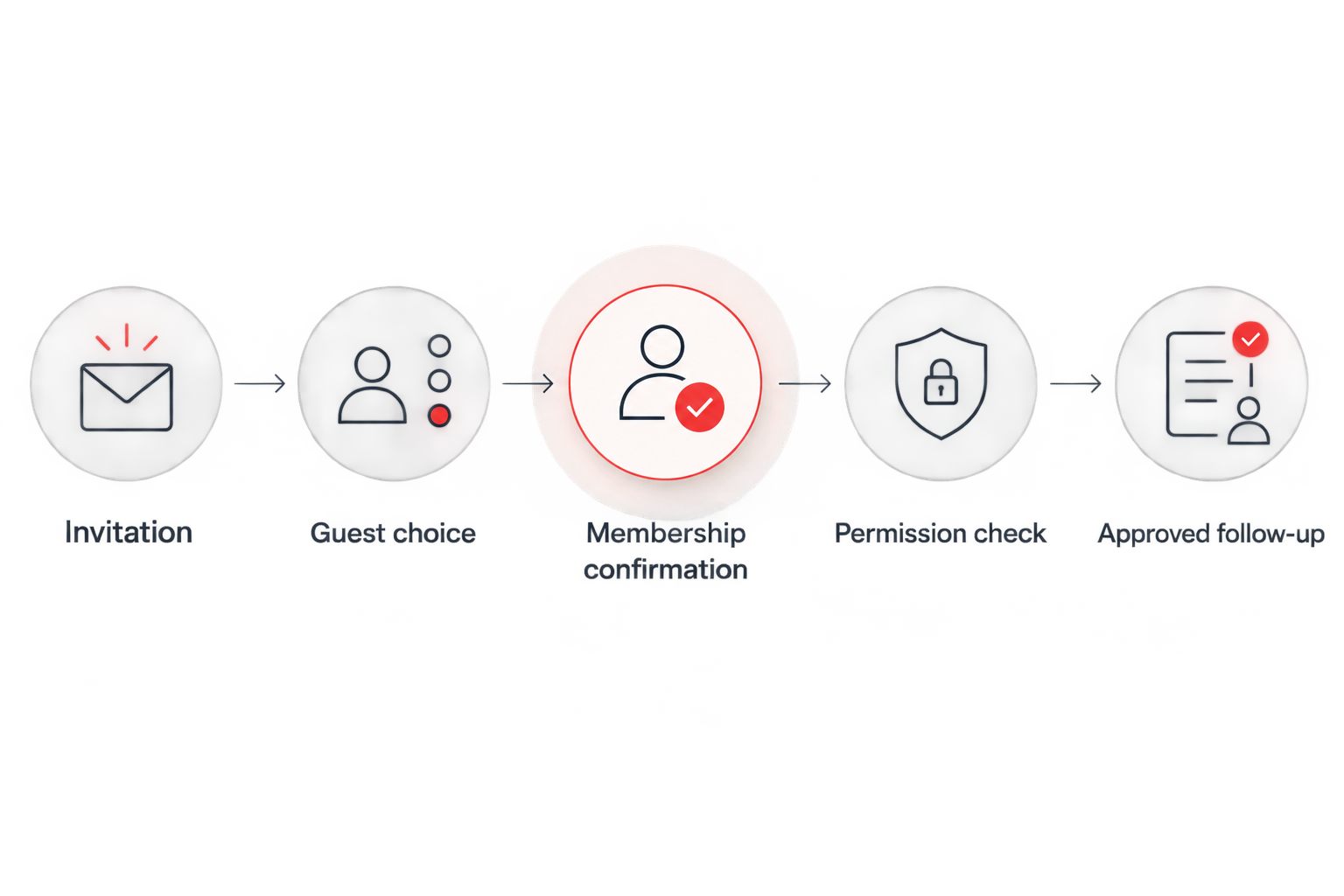 Confirm membership and permission separately before starting promotional follow-up.
For the 2026 implementation record, retain the approved permission wording and the date it took effect. When wording changes, your team needs to know which version governed the original signup.
Checkout and launch controls
Treat checkout as an operational process, not just a software setting. Staff need to know when to explain the program, when to let the guest decide, and when to stop trying to enroll an existing member.
Configure the guest-facing process
- Use the enrollment method confirmed in your Toast documentation or verified external integration. Follow its actual screen labels rather than instructions copied from an unrelated restaurant’s setup.
- Place the program explanation before the guest’s enrollment decision. Explain the membership terms accurately; do not add benefits that the program does not provide.
- Give staff a short instruction: identify whether the guest wants to join, direct the guest through the approved signup process, and check the completion evidence. Staff should not make permission choices for the guest.
- Test 5 cases: a new member, an existing member, a guest who declines, incorrect identifying information, and a repeated signup attempt. These are acceptance tests, not performance benchmarks.
- Record the result of each case, the responsible owner, and any corrective action. Keep the workflow out of general rollout until the acceptance criteria pass.
Expected result: A new signup produces confirmed membership, an existing member avoids unnecessary reenrollment, and a declined invitation produces no enrollment action.
Configure launch monitoring
- Assign an operations owner to checkout behavior and a marketing owner to downstream communication. Name the person who resolves disputes between systems.
- Review enrollment exceptions daily during the first 7 days. This is a suggested launch schedule, not a Toast requirement.
- Compare completed memberships with attempted signups wherever your systems provide those records. Investigate incomplete cases instead of reporting invitations as enrollments.
- Review the workflow after 30 days. Examine duplicate records, staff questions, permission handling, and whether enrolled guests can be recognized on a later visit.
Expected result: Your 2026 launch has named owners, recorded exceptions, and a defined review date rather than an unattended automation.
Do not use enrollment totals alone to judge business impact. Track repeat visits separately, and do not describe a change in visits as caused by loyalty enrollment without evidence supporting that conclusion.
Variant: recognize returning members after enrollment
A useful adjacent workflow starts with an existing member rather than a new signup. Its purpose is to recognize membership during a later transaction without restarting enrollment or resending a welcome sequence.
Best for: Restaurants that have confirmed the initial enrollment process and need consistent treatment of returning members.
- Confirm how your enabled loyalty process identifies an existing member during a transaction. Use that documented method consistently in staff training.
- Test a later purchase with an authorized test member. Check that the transaction associates with the intended membership according to the program’s rules.
- Keep membership confirmation separate from transaction activity. A new purchase should not be treated as a new enrollment event in your downstream design.
- If an external workflow handles follow-up, require documented event identifiers and duplicate-handling behavior before enabling automated messages.
- Apply the relevant permission check before promotional follow-up. Recognition as a member does not replace that check.
Expected result: A returning guest remains associated with the existing membership and does not enter the new-member path again.
The advantage is continuity. The trade-off is additional testing: your team must verify both the signup event and the later transaction behavior rather than assuming that successful enrollment proves both.
Troubleshooting
The loyalty configuration is missing
Check the administrator’s permissions and whether the intended loyalty product is enabled for the restaurant account. Confirm the current navigation with Toast support or account documentation; do not compensate by building an unofficial enrollment spreadsheet.
Fix: Resolve access and product scope before training staff or connecting another platform.
The guest paid but never became a member
Trace the guest’s actual signup action and look for membership confirmation. Payment completion and receipt delivery are not sufficient acceptance criteria for this workflow.
Fix: Repeat the approved enrollment test and identify the exact stage where the guest stopped. Correct the instruction or configuration at that stage.
An existing member gets another welcome message
Inspect what triggered the message. A workflow built around every transaction or every profile update does not distinguish first-time enrollment from ongoing activity.
Fix: Require a confirmed new-membership event and a record that the welcome action has already occurred. Use only event and state controls supported by the chosen systems.
Duplicate member records appear
Compare the identifiers supplied during signup and later visits. Investigate inconsistent entry and external matching rules before deciding whether records should be combined.
Fix: Follow the platform’s documented correction process. Do not merge records solely because names match or ask staff to bypass identity checks.
Enrollment succeeds but external follow-up fails
Separate the membership result from the connection result. Inspect the external platform’s documented connection status, required fields, error records, and permission rules.
Fix: Repair the failed handoff without reenrolling the guest. Confirm the platform’s retry behavior before replaying an event, so the correction does not create duplicate actions.
Customize your workflow
Once enrollment works, expand around a specific business question: Can staff recognize returning members? Are enrollment exceptions concentrated at one location? Does approved follow-up reach the intended audience?
Use the 2026 review to prioritize one change at a time. Adding more messages or destinations before fixing identity handling increases the number of places your team must investigate.
Carey Kidd Group’s fractional CMO services address marketing leadership, not a proprietary Toast connector. That distinction matters: strategic ownership can define requirements and accountability, while account configuration and integration work still need a qualified implementation owner.
For a separate hospitality workflow, review the OpenTable reservations to repeat guests guide. Keep reservation identity and loyalty membership distinct unless a verified connection establishes how they relate.
FAQ
How do I connect Toast POS to loyalty program enrollment?
Start with the enrollment method supported by your enabled Toast Loyalty setup or a documented external loyalty connection. Define the guest’s signup action, verify membership confirmation, and test existing-member handling before rollout.
Does a Toast payment automatically enroll a guest in loyalty?
Do not treat a completed payment as evidence of enrollment. Require the membership confirmation defined by your enabled loyalty process.
Should I use Toast Loyalty or a separate loyalty platform?
Choose the simplest documented enrollment route that meets your restaurant’s requirements. A separate platform adds connection and identity-management responsibilities, so verify its supported membership actions before selecting it.
Can I send promotional texts after someone joins a loyalty program?
Loyalty enrollment alone is not your permission check for promotional texts. Verify the applicable consent requirements and the guest’s recorded channel permission before sending.
How do I prevent duplicate loyalty enrollments?
Use the member identifier and existing-member lookup supported by your chosen platform. Test repeated signup attempts and follow the documented correction process when duplicates occur.
What should I test before launching a Toast loyalty enrollment workflow?
Test a new member, an existing member, a declined invitation, incorrect identifying information, and a repeated signup attempt. Record membership outcomes and downstream actions separately.
Can Carey Kidd Group provide the loyalty software?
Carey Kidd Group provides fractional CMO and strategic marketing consulting services, not a stated loyalty software product. The relevant role is marketing strategy, implementation accountability, and coordination around the restaurant’s chosen systems.
One last thing
Test the guest who says no. An enrollment workflow is not complete until a declined invitation leaves the guest unenrolled and does not start promotional follow-up.
Add that refusal case to every material workflow change in 2026. It tests whether your implementation respects the difference between an invitation, a membership, and permission to communicate.