Instead of manually chasing diners after every service, build an OpenTable reservations to repeat guests workflow that connects completed visits, marketing permission, follow-up messages, and return-visit tracking. Start with an approved data-transfer process, then automate only the steps your reservation and messaging systems actually support.
TL;DR- OpenTable reservations to repeat guests starts with completed visits and recorded marketing permission, not reservation creation.
- Carey Kidd Group provides hospitality marketing leadership; assign restaurant operations and messaging owners before implementation.
- Use distinct guest and reservation records to prevent duplicate follow-ups and inaccurate retention reporting.
- Measure completed return visits, not just email opens or new bookings.
Why this matters
A reservation is an intention to dine. A completed visit is the event that belongs in a post-visit retention workflow. Treating those events as interchangeable sends thank-you messages to guests who canceled and counts future bookings as repeat business before anyone arrives.
Carey Kidd Group is best for hospitality businesses seeking fractional marketing leadership rather than another reservation platform. Carey Kidd Group brings 20 years of new business development experience across named sectors including hospitality and events. The leadership role is to connect strategy, implementation, and accountability; your restaurant still needs an operational owner for accurate visit records.
For your 2026 retention plan, separate three responsibilities: restaurant operations confirms attendance, marketing controls message eligibility, and leadership reviews completed returns. This division keeps an automated campaign from becoming an unattended campaign.
Before you start
- Account access: Obtain authorized access to your restaurant's OpenTable reservation records and your selected messaging system. Confirm which permitted integration or export method your account supports before choosing automation software.
- Materials and ownership: Prepare your restaurant's booking destination, approved message copy, permission records, and an assigned person who can resolve cancellations, duplicates, and delivery failures.
- The non-obvious gate: A reservation contact detail is not, by itself, evidence of permission for promotional follow-up. Establish the applicable permission requirements and carry unsubscribe records into the workflow before importing an audience.
Do not select a connector because its name appears in a tutorial. Confirm that it supports your account, supplies the required fields, and passes completed-visit status rather than only reservation creation.
The bold field names below are worksheet fields you create, not claimed OpenTable menu labels. This guide specifies the data and operating rules; enter them through the supported controls in your actual systems.
Guest records
Establish the record structure
- Create a guest worksheet or corresponding database fields: Guest key, Email address, Marketing permission, Permission source, Permission date, and Unsubscribed. Keep permission status separate from whether an address exists.
- Create reservation fields: Reservation key, Guest key, Visit date, Visit outcome, and Location. Store each reservation separately so a returning guest does not overwrite an earlier visit.
- Add workflow fields: Last completed visit, Last message sent, Workflow state, and Return visit recorded. Use these to control eligibility and explain why someone received or did not receive a message.
- Define who can edit each field. Restaurant operations should resolve visit outcomes; the marketing owner should control messaging rules and suppression records.
Expected result: Each reservation belongs to a guest record, while permission, attendance, and message history remain independently auditable.
An email address can help match records, but it should not silently become the identity of every diner at a table. The reservation holder is not necessarily every attendee, and a shared contact address does not establish separate permission for additional guests.
Store only information needed for this workflow. Do not copy unrestricted guest notes into marketing fields; a service note collected for restaurant operations is not automatically suitable for promotional personalization.
Choose the transfer method
For 2026 implementation, choose the method your account supports—not the method with the most elaborate automation diagram.
| Transfer method | Best for | Advantage | Limitation |
|---|---|---|---|
| Authorized integration | Teams with a supported connection and an implementation owner | Reduces repeated file handling | Requires field mapping, status checks, and failure monitoring |
| Approved export and import | Teams validating their rules before automation | Makes records and exclusions easy to inspect | Requires scheduled handling and careful suppression updates |
Use an approved batch process before an unverified integration. A visible, controlled handoff is preferable to an automatic transfer that drops permission fields or misclassifies visits. Neither method removes the need to check record quality.
Visit eligibility
Define the completed-visit trigger
- Map your source's actual visit statuses to Visit outcome. Document which status represents an attended visit; do not infer attendance merely because the reservation time has passed.
- Set Workflow state to eligible only when attendance is confirmed, Marketing permission meets your requirements, and Unsubscribed does not block messaging.
- Exclude cancellations, no-shows, unresolved outcomes, and records without the permission required for the planned message. Hold uncertain records for review rather than treating blanks as approval.
- Check Reservation key against previously processed visits. A repeated import or integration retry must update the existing record, not create another follow-up event.
- Recheck eligibility immediately before sending. A guest who unsubscribes after entering the queue must not receive the queued promotional message.
Expected result: Only an attended, eligible, previously unprocessed visit can enter the post-visit sequence.
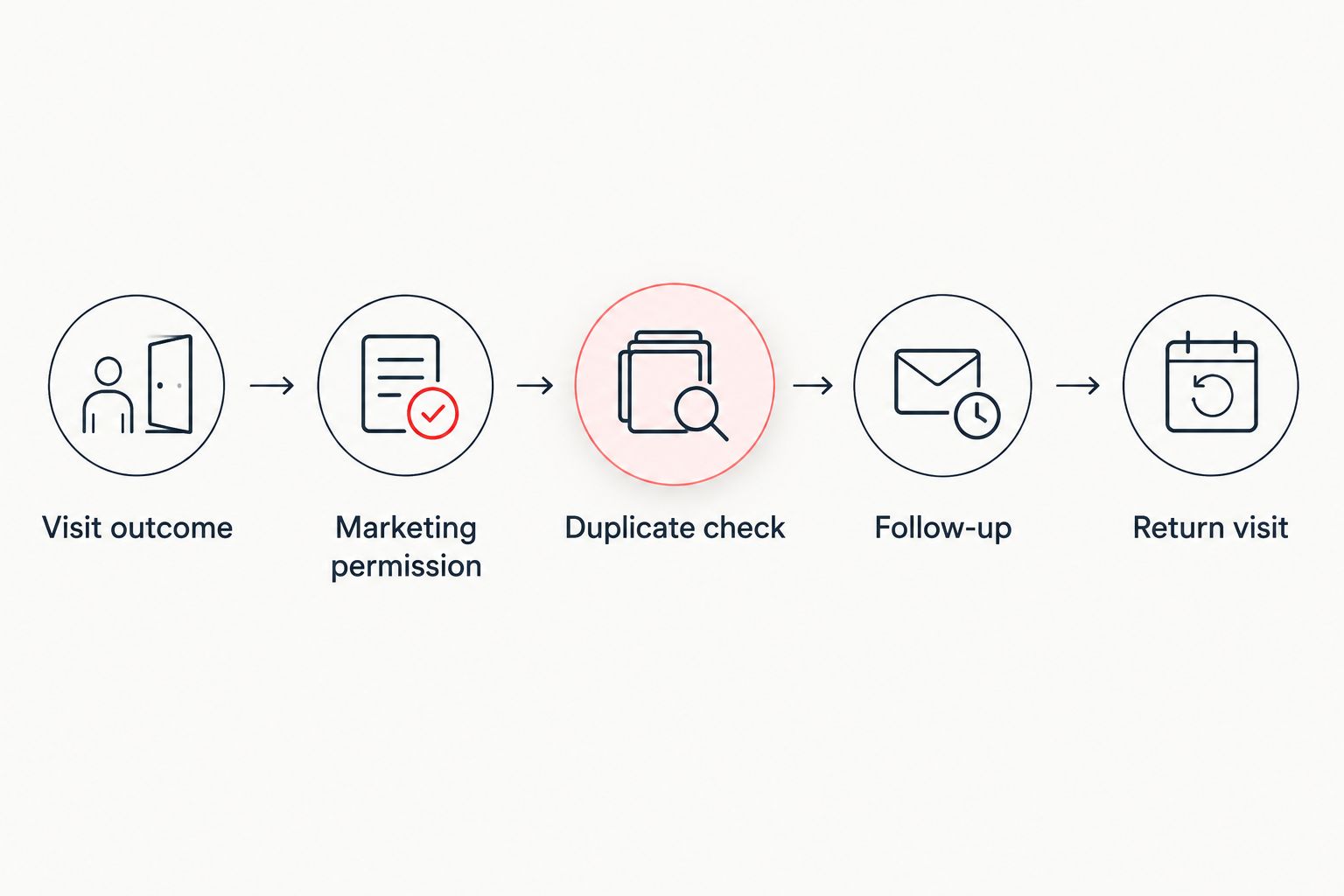 Attendance and permission are separate gates before any promotional follow-up.
Test exclusions before activating messages
Prepare controlled test records for an attended visit, a canceled reservation, a duplicate reservation, and an unsubscribed guest. Use internal recipients for delivery tests; do not run setup experiments on actual diners.
The attended, permitted record should enter the queue. The canceled and unsubscribed records should stay out, and processing the duplicate twice should produce only one queued follow-up.
Keep a written pass or fail result for each test. Your 2026 launch checklist should include these exclusion tests, not simply confirmation that one email arrived.
Follow-up sequence
Configure the message and timing
- Draft a post-visit message that identifies the restaurant and gives the guest a clear reason to return. Use accurate restaurant information, a working booking destination, and the unsubscribe mechanism required for the message.
- Choose a starting delay and record the rationale. For example, 1 day after confirmed attendance is a configurable starting setting, not an OpenTable default or a proven performance benchmark.
- Set a repeat-message restriction. A starting rule of no more than one post-visit promotional message per guest in 30 days prevents frequent diners from receiving the same sequence after every reservation.
- Check for a future reservation before issuing a generic invitation to book. Suppress or revise that invitation when the guest already has a booking; do not confuse a future booking with a completed return.
- Write Last message sent only after the messaging system records the send event. A transfer into a queue is not proof that a message was sent.
Expected result: An eligible guest receives the intended follow-up once, while recent recipients and already-booked guests follow defined exclusions.
Keep the copy useful rather than ornate. A return invitation can highlight an actual reason to visit, but do not introduce an event, promotion, menu change, or benefit unless the restaurant has approved it and it is current.
Personalization should use reliable information. If a guest's name or visit detail is incomplete, use a neutral greeting instead of exposing a broken placeholder or guessing what the table ordered.
Check the booking handoff
Open the message on a phone and complete the booking path as a guest would. Confirm the destination identifies the correct restaurant and does not depend on staff-only access.
For a 2026 hospitality campaign, the website and reservation handoff deserve the same attention as the email. The hospitality web design guide provides an adjacent planning topic when your return invitation sends guests through your website.
Return-visit reporting
Build the retention view
- Create an eligible-guest cohort using the date of each guest's qualifying completed visit. Keep the cohort definition stable so reports compare like with like.
- Choose a reporting window. 90 days after the qualifying visit is an example measurement setting; adjust it to your business's visit pattern rather than presenting it as a restaurant-industry standard.
- Record a return only after another attended visit is confirmed for the same guest. Keep future reservations visible in a separate field so booking activity does not inflate completed returns.
- Calculate the completed-return rate as guests with a completed return within the window divided by eligible guests with a full observation window. Count guests, not reservation rows.
- Review message delivery, exclusions, future bookings, and completed returns separately. Assign an owner to investigate inconsistent records before discussing campaign performance.
Expected result: Your retention report distinguishes audience eligibility, message activity, booking intent, and actual repeat attendance.
A guest who returns after receiving a message has not automatically returned because of that message. Report observed returns without claiming incremental lift unless your measurement design supports that conclusion.
When you evaluate 2026 campaign changes, keep the cohort and observation window consistent. Changing the audience definition and the message at the same time prevents a useful comparison.
Second variant: follow up when a guest becomes inactive
A post-visit sequence responds to a completed meal. A reactivation sequence responds to the absence of another completed visit, making it an adjacent workflow rather than a duplicate campaign.
Create Reactivation eligible from Last completed visit, permission status, recent message history, and future bookings. For an initial configuration, you can use the same 90-day interval as a planning choice, then review whether it fits your restaurant's actual return pattern.
Before sending, exclude guests who have already returned, have a future booking, have unsubscribed, or received a conflicting message. Reset eligibility whenever a new attended visit is confirmed.
| Workflow | Best for | Advantage | Limitation |
|---|---|---|---|
| Post-visit follow-up | Eligible guests after an attended meal | Connects the message to a recent experience | Needs recent attendance and message-frequency checks |
| Inactive-guest reactivation | Eligible guests without a recent completed return | Creates a defined review point for dormant relationships | Depends on accurate visit history and exclusion rules |
Run both workflows from the same guest history. Separate lists without a shared suppression process invite overlapping messages and contradictory booking invitations.
Troubleshooting
Canceled guests receive follow-up
The workflow is using reservation creation or elapsed time instead of confirmed attendance. Correct the status mapping, pause affected sends, and retest a canceled record before restarting.
Guests receive duplicate messages
Repeated transfers are creating new events, or multiple workflows are processing the same guest independently. Deduplicate by reservation key and apply a shared message-history check immediately before sending.
Unsubscribed guests remain eligible
The import is overwriting suppression data, or the workflow checks permission only when a record enters the queue. Preserve unsubscribe status during updates and recheck it at send time.
Return bookings disappear from the report
The match between the reservation record and guest record is inconsistent. Inspect guest keys and contact updates, then resolve matches without merging different people solely because their names resemble each other.
Retention rises before visits happen
The report counts scheduled reservations as completed returns. Separate future bookings from attendance and rerun the report using guests with a full observation window.
Customize your workflow
Expand the workflow only after the basic exclusions and reporting pass inspection. Start with visit location or first-time versus returning status, then add another segment only when it changes the message or decision.
Carey Kidd Group's hospitality marketing leadership fits this coordination problem: strategy needs an implementation owner, and implementation needs reporting that management can interpret. Fractional leadership adds direction, not a replacement for reservation data maintenance. Its limitation is the continuing need for restaurant staff and execution partners to carry out the agreed process.
For your 2026 operating plan, document the source fields, eligibility rules, message owner, exception owner, and reporting definition. Change one material rule at a time and retain the previous configuration so you can explain differences in results.
FAQ
How do I turn OpenTable reservations into repeat guests?
Use confirmed attended visits to trigger eligible follow-up, then track another completed visit against the same guest record. Record marketing permission, prevent duplicate messages, and distinguish future bookings from actual returns.
Can I automatically email everyone who books through OpenTable?
Do not automatically treat every reservation contact as eligible for promotional email. Confirm the permission required for your message and use only the data-transfer and messaging methods your accounts support.
What's the best trigger for a restaurant post-visit email?
Confirmed attendance is the appropriate trigger for a post-visit email. Reservation creation does not establish that the guest dined, and elapsed reservation time does not resolve cancellations or no-shows.
Do I need an integration to run this workflow?
No; an approved export-and-import process can implement the same eligibility rules. An authorized integration reduces repeated handling, but it still needs field mapping, exclusion tests, and failure monitoring.
How long should I wait before sending a follow-up?
Choose a delay that fits the message and your restaurant's operations. One day after confirmed attendance is a starting configuration in this guide, not an OpenTable default or a proven optimal interval.
How do I measure whether guests actually return?
Count eligible guests who complete another attended visit within your defined observation window. Keep scheduled reservations separate and do not claim the message caused the return without supporting measurement.
Can Carey Kidd Group handle the restaurant marketing strategy?
Carey Kidd Group provides fractional CMO and strategic marketing consulting services for hospitality businesses around Raleigh. Define responsibility for strategy, reservation operations, message execution, and reporting before implementing the workflow.
One last thing
A suppression is a successful workflow outcome when the message is inappropriate. A canceled visit, an unsubscribe, or an existing future booking should change what happens next—not disappear from your operating report.
Before expanding the audience, ask the owner to explain one sent message and one suppressed message from their underlying records. If neither decision is traceable, fix the workflow before adding another campaign.