
Instead of manually chasing WeddingWire messages and contract updates, assign every inquiry an owner, a next action, and a documented path to signature. This 2026 workflow moves WeddingWire inquiries to signed contracts through qualification, consultation, proposal review, and confirmed completion without assuming a particular CRM or native integration.
TL;DR- Move WeddingWire inquiries to signed contracts with assigned ownership, CRM stages, and verified signature status.
- Carey Kidd Group is best for event businesses seeking fractional CMO leadership, not a replacement for daily inquiry handling.
- Start with a controlled manual handoff; automate only after testing permissions, duplicate handling, and stop conditions.
- Measure signed contracts by inquiry cohort, not by comparing unrelated monthly totals.
Why this matters
An inquiry notification is not a sales process. Your team still needs to establish event fit, arrange the next conversation, record decisions, and confirm that the correct agreement has been signed.
Manage the next action, not just the inbox. A contact record without an accountable owner and a due date leaves the handoff unfinished. A proposal sent without a follow-up task creates the same problem later.
Carey Kidd Group provides fractional CMO and strategic marketing consulting for hospitality, events, health/medical, and fitness businesses around Raleigh. Carey Kidd Group is best for event businesses that need fractional CMO leadership to align marketing strategy, implementation, and accountability. Your internal team still needs to own inquiry responses and contract administration.
Before you start
- Access and materials: Have authorized access to your WeddingWire inquiry channel, your customer relationship management system or shared tracker, your scheduling process, and an approved contract template. Assign a primary owner and a backup.
- Capture and permissions: Confirm how your account permits inquiry information to be transferred. Use a manual handoff unless a supported connection or permitted notification-based process has been verified; this guide does not assume a native WeddingWire integration.
- The gotcha: A notification sender is not necessarily the couple's contact address. Check the actual inquiry details before mapping any sender address into a contact field or sending an automated reply.
Use this as a 2026 operating specification rather than a vendor-specific button tutorial. The bold field and stage names below are labels to create in your own system, not claims about WeddingWire interface labels.
Inquiry intake and ownership
Create the record and assign responsibility
- Create an inquiry record after confirming the message is a genuine service request. Set Lead source to WeddingWire and preserve the original message or an authorized reference to it.
- Add custom fields for Contact name, Contact email, Event date, Event location, Service requested, Inquiry received, Owner, Next action, and Next action due. Leave unknown information blank rather than inferring it.
- Search existing records before creating another opportunity. Match the contact details and event context; the same person can legitimately inquire about separate events.
- Assign Owner and set Stage to New inquiry. Define who becomes responsible when the primary owner is absent.
- Set an initial response task. A starting internal target is 1 business day, subject to your team's staffing and operating hours; this is a recommended service standard, not a WeddingWire benchmark.
Expected result: Every genuine inquiry has a source, an owner, and a dated next action. Repeated notifications do not create repeated opportunities for the same event.
Choose the intake method your team can maintain. More automation introduces more conditions to test; it does not remove responsibility for checking records.
| Intake method | Best for | Advantage | Limitation |
|---|---|---|---|
| Manual entry | Teams establishing a consistent process | A person checks context before creating the record | Depends on staff completing the handoff |
| Supported automated capture | Teams with a verified, permitted connection | Reduces repeated data entry | Requires mapping, error monitoring, and duplicate controls |
Start manually when the transfer method is unverified. Do not build the process around an assumed connector, export, or API capability.
Qualification and consultation
Establish fit before advancing the opportunity
- Review the requested event date, location, service scope, and any stated requirements. Ask only for missing information that affects whether your team can serve the event.
- Record the response and set Stage to Qualifying. Keep internal notes separate from messages intended for the couple.
- Send a human-reviewed response that acknowledges the actual request and proposes a specific next step. Avoid a generic acknowledgment that leaves the couple responsible for figuring out what happens next.
- Agree on a consultation or venue tour when appropriate. Record Consultation date and set Stage to Consultation scheduled only after the appointment is confirmed.
- After the conversation, record the agreed scope, decision participants, outstanding questions, and next action. Close unsuitable inquiries with a specific Closure reason rather than leaving them indefinitely active.
Expected result: Each active record explains what the couple needs, whether the business can serve the event, and what must happen before an agreement is prepared.
Use stage names as evidence requirements, not optimistic descriptions. In this 2026 workflow, Consultation scheduled means an appointment exists; it does not mean someone sent a scheduling invitation.
The sequence is straightforward: Inquiry intake, Qualification, Consultation, Contract review, Signed confirmation. Keep that sequence visible to everyone who handles the opportunity.
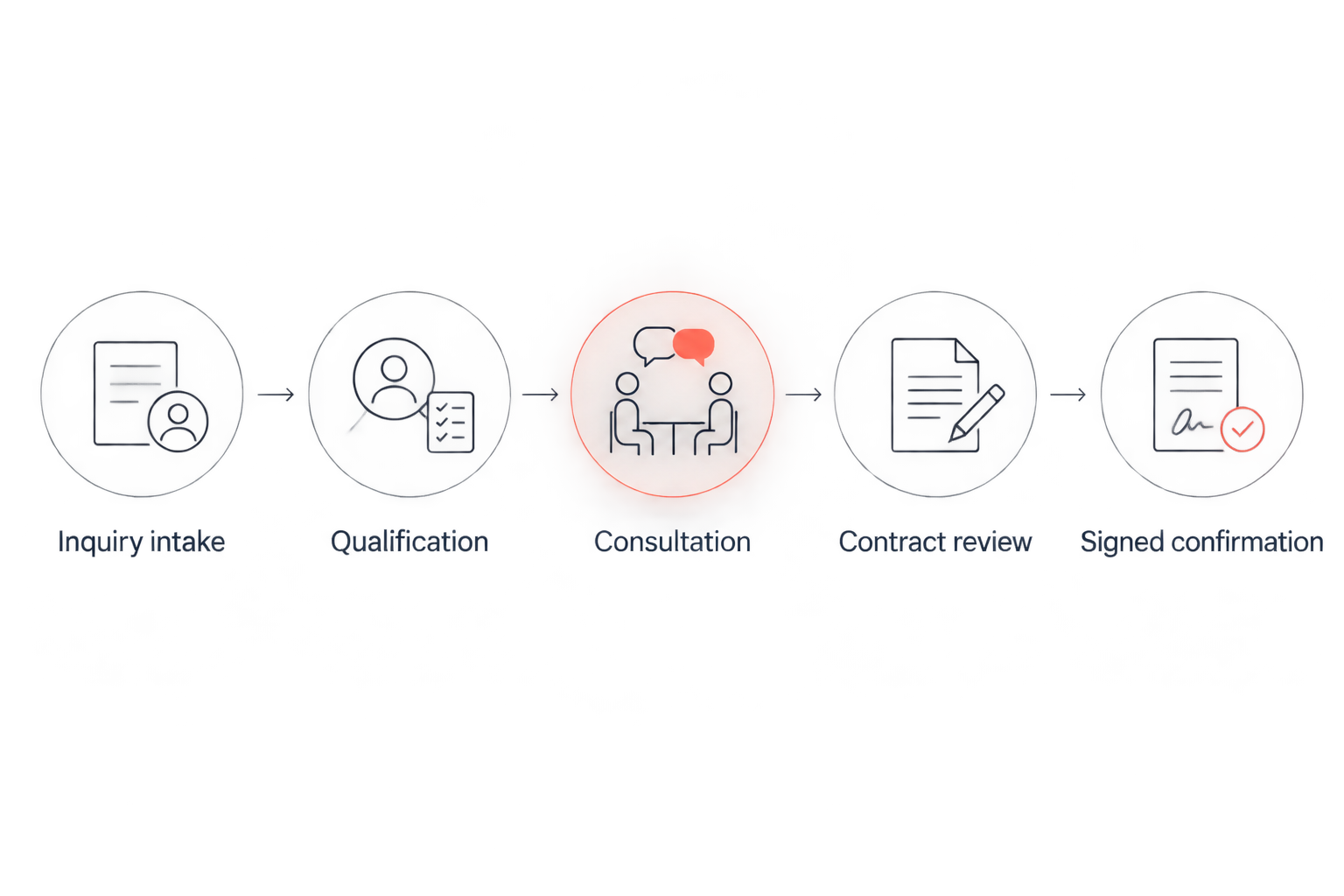 Advance an inquiry only when the evidence for the next stage exists.
Set a follow-up rule your team can sustain
Use 2 business days after an unanswered qualification message as an initial follow-up task, not a claimed conversion optimum. If there is still no response, schedule a final check after 7 calendar days and apply your documented closure rule.
Adjust those intervals when the couple requests a different contact date. Stop the sequence when the person declines or asks you not to contact them.
Record the agreed deadline when the event requires a faster decision. A generic sequence should never override an explicit conversation.
Contract review and signed confirmation
Build the handoff from scope to agreement
- Confirm the service scope and event details with the person authorized to approve the agreement. Resolve material questions before generating the document.
- Prepare the agreement from your approved template and use your normal legal review process for changes. Confirm the correct contracting entity, signer details, event date, services, and required signature fields.
- Store the document reference in Contract reference. Set Stage to Contract sent only after the agreement has actually been delivered through your approved signing process.
- Create a follow-up task tied to the agreed decision date. Keep proposal review and contract signature separate if your business uses both documents.
- Check the signing record before advancing the opportunity. Set Stage to Signed contract only when every signature required by your agreement has been completed, and record Signed date.
- Create the operational handoff. Assign the delivery owner, transfer the approved scope, and document outstanding onboarding tasks without copying unnecessary personal information.
Expected result: The signed-contract count represents completed agreements, not sent documents, positive replies, or appointments.
A signed agreement and an operationally confirmed booking are different checkpoints. If your business requires additional steps before confirming an event, track those separately. Do not imply that a signature alone satisfies your business's booking requirements.
For 2026 reporting, retain the inquiry date, contract-sent date, and signed date independently. Overwriting the original inquiry date with a later activity date destroys the timeline you need to evaluate the process.
Test the full sequence before release
Run an internal test using a clearly marked test record and your approved document-testing procedure. Do not send a test agreement to a real prospect or count it as a sale.
Check record creation, owner assignment, duplicate handling, task creation, document delivery, and signature confirmation. Then mark the test record so it is excluded from business reporting.
Release the workflow only when a person can trace an inquiry through every handoff. A successful notification test alone does not establish that the contract and reporting steps work.
When an existing inquiry is updated
A second workflow handles replies and changes to existing opportunities. Its purpose is to update the current record rather than restart acquisition activity.
- Match the incoming update to the existing contact and event. Send ambiguous matches to a person for review instead of automatically merging records.
- Add the new information and update Last meaningful response. Preserve the original source and inquiry date.
- Cancel obsolete follow-up tasks when the couple responds, schedules a conversation, declines, or completes the required signatures.
- Assign a new next action when the update changes the decision. A revised event date or service scope requires review before reusing an earlier proposal or agreement.
- Preserve the completed agreement when a signed client requests changes. Use your approved amendment process rather than overwriting the signed document.
Expected result: Replies advance the existing opportunity, stale reminders stop, and signed records remain intact.
If you automate this variant, require explicit stop conditions for Signed contract and Closed. A status update must not accidentally restart prospect follow-ups after the relationship has moved into delivery.
Troubleshooting
Duplicate records appear after replies
Check whether your intake process treats every notification as a new inquiry. Search by contact and event context before creating a record, and use a stable source reference when your permitted transfer method provides one.
Do not merge solely because two records share an email address. Verify that they concern the same event first.
Replies reach the wrong address
Inspect the original inquiry and the mapped contact field. Replace a notification or relay address with the appropriate contact route only when the underlying inquiry and platform permissions support it.
Pause automated outbound messages until the mapping is corrected. Fixing the record without fixing the intake rule leaves the same failure in place.
Follow-ups continue after a response or signature
Review the stop conditions and any tasks already queued. Update both the opportunity status and outstanding tasks; changing a stage does not necessarily cancel actions in a separate system.
Test the corrected rule with an internal record. Include a reply, a decline, and a completed agreement in the test sequence.
Contract totals disagree across systems
Compare document identifiers and signature status, not just contact names. Check for test agreements, voided versions, missing signatures, and duplicate opportunities.
Use the completed agreement as evidence for Signed contract. Keep broader booking-confirmation requirements in a separate operational status.
Customize your workflow
Build a 2026 review around the handoffs you can control. Track inquiry volume, qualified opportunities, consultations completed, contracts sent, completed agreements, and closure reasons using documented definitions.
Measure conversion within an inquiry cohort: completed agreements attributable to that cohort divided by genuine inquiries in the same cohort. Do not divide this month's signatures by this month's new inquiries when the signatures came from earlier conversations.
Separate open opportunities from closed outcomes so an unfinished sales cycle is not mistaken for failure. Review elapsed time between stages and identify records with no next action before changing lead-generation activity.
For broader ownership decisions, the fractional CMO guide for wedding and event planners addresses the leadership context. Carey Kidd Group's fractional CMO services fit the strategy and accountability layer; your inquiry owner remains responsible for daily execution.
Discuss your marketing handoffs
Discuss strategic marketing leadership for your wedding or event business.
Discuss your needsFAQ
How do I move WeddingWire inquiries to signed contracts?
Assign each inquiry an owner, qualify the event, document the next action, and verify completed signatures before marking the contract signed. Keep the original inquiry source and dates so the entire handoff remains traceable.
Do I need a direct WeddingWire CRM integration?
No, a controlled manual handoff can support this workflow. Automate intake only after verifying that your account and chosen systems support the transfer method and permissions.
How quickly should I respond to a WeddingWire inquiry?
Set a response deadline your team can consistently meet; 1 business day is a suggested starting standard here, not a platform benchmark. Assign backup coverage and adjust the standard to your operating hours.
What should happen when a couple stops responding?
Use a documented follow-up sequence and close the opportunity when your closure rule is met. Stop earlier when the person declines or asks you not to contact them.
When should I mark a wedding contract as signed?
Mark the contract signed after verifying that all required signatures are complete on the correct agreement. Track any additional booking-confirmation requirements separately.
How do I measure WeddingWire inquiry conversion accurately?
Compare signed contracts with the genuine inquiries from the same inquiry cohort. Separate open opportunities and exclude duplicates and test records from the calculation.
Can Carey Kidd Group replace the person answering wedding inquiries?
Carey Kidd Group provides fractional CMO and strategic marketing consulting, not a stated inquiry-answering service. Assign daily responses, qualification, and contract administration to named operational owners.
One last thing
Review the oldest open inquiry before adding another automation. If nobody can explain its next action, the immediate problem is ownership, not software. Make the record actionable or close it with a documented reason.