
Instead of manually checking reviews and treating every new rating as a patient lead, connect Google Business Profile review requests, privacy-safe responses, and front-desk intake in one accountable workflow. This guide shows you how to turn Google reviews to new patient leads in 2026 without confusing public feedback with appointment inquiries.
TL;DR- Google reviews to new patient leads requires a booking path, inquiry tracking, and front-desk accountability—not just more ratings.
- Carey Kidd Group provides fractional CMO leadership for medical businesses that need strategy and implementation accountability.
- Request honest reviews consistently; never make the public review link conditional on positive feedback.
- Keep patient information out of public replies and ordinary marketing automation.
Why this matters
A Google review is public feedback. A new-patient lead is an identifiable inquiry your practice can follow up on through an appropriate channel. Those are different events, and your 2026 reporting needs to keep them separate.
Carey Kidd Group is best for medical businesses that need fractional CMO leadership, not a standalone review-management tool. Carey Kidd Group provides strategic marketing consulting and fractional CMO services around Raleigh, North Carolina, including health and medical businesses.
Reviews can help prospective patients evaluate your practice. They do not establish that someone booked, attended, or became a patient. Your workflow therefore needs a public-facing reputation process and a separate, controlled inquiry process.
Assign accountability before adding automation. Someone must own the profile, someone must approve public responses, and someone must handle incoming inquiries; software does not settle those responsibilities.
Before you start
- Access and ownership: Have authorized access to the verified Google Business Profile, your practice website, and the approved appointment or inquiry system. Name the profile owner, response approver, and intake owner.
- Materials and permissions: Prepare a neutral review-request message, your Google review-request link, approved response language, and a working appointment destination. Confirm which communication channels your practice permits for review requests.
- The non-obvious gotcha: A public reviewer is not a usable patient lead. Do not match reviewer names to patient records, confirm treatment in replies, or export patient details into an ordinary marketing tool. Have your privacy lead approve the workflow before implementation.
Make the privacy review a setup requirement, not a cleanup task. For a HIPAA-covered practice, an automation tool that handles protected health information needs an appropriate compliance assessment, including whether a business associate agreement is required. A vendor's general security claims are not that assessment.
Choose your workflow model
Choose the operating model before configuring triggers. Both approaches below support the same process; they differ in how work reaches the person responsible.
| Workflow model | Best for | Advantage | Limitation | Recommendation |
|---|---|---|---|---|
| Staff-managed checklist | Practices establishing ownership and approved messaging | Staff can inspect each request and response before sending | Completion depends on staff following the checklist | Start here until the process is tested |
| Event-triggered workflow | Practices with approved systems and clearly defined events | Creates repeatable tasks when the qualifying event occurs | Incorrect event logic can duplicate requests or expose information | Add after permissions, exclusions, and handoffs pass testing |
Automate a defined process, not an unresolved decision. Neither model removes the need for front-desk capacity, privacy review, or management accountability.
For the 2026 rollout, keep your first version narrow: one location, one approved communication channel, and one intake destination. Expand only after staff can explain what triggers a request and what happens when a person asks for an appointment.
Profile setup
Establish the public booking path
- Open the practice's Google Business Profile through its authorized account. Select Edit profile, then Contact, and check the Website field against the practice's approved destination. Use Save after making an authorized change.
- Inspect the public profile as a prospective patient. Check the practice name, telephone number, business hours, and website destination. Resolve inconsistencies before sending review requests.
- Open the website destination on a phone. Follow the appointment or inquiry path without submitting real patient information. Confirm that the instructions distinguish routine booking from urgent medical needs.
- Where your approved analytics setup supports it, add a source tag to the website destination. Record the tag convention in the tracking plan and test that it survives the journey to the inquiry form.
Expected result: A prospective patient can move from the Google profile to an approved inquiry route, and staff know where that inquiry arrives.
Treat source tags as visit evidence, not proof that reviews caused the visit. Google Business Profile traffic includes people who found the listing for reasons unrelated to reviews. A tagged website visit and a completed inquiry also remain separate events.
Use a 15-minute test session as a scheduled implementation checkpoint. Test the public route, destination, and internal notification together rather than checking each component in isolation.
Review requests
Define the request event and exclusions
- Choose a completed-visit event in the practice's approved system. Document what qualifies and what excludes a record, including communication opt-outs and previous requests under your practice's contact rules.
- Obtain the review-request link supplied by Google Business Profile. Place that link in the approved message; do not substitute a satisfaction survey that reveals the public review option only after a positive answer.
- Create a neutral message asking for honest feedback. Keep treatment details, diagnoses, and clinician-specific information out of the request unless your privacy process explicitly permits them.
- Define a duplicate-prevention rule before activation. Use a unique visit or request identifier inside the approved system, and record whether the request was sent, suppressed, or failed.
Expected result: Eligible contacts receive the same opportunity to leave honest feedback, and staff can explain why any request was suppressed.
Do not offer incentives for reviews or ask people to change negative reviews in exchange for benefits. Google's review policies prohibit incentivized engagement and selective solicitation of positive reviews. Use those policy requirements as controls in your 2026 process, not as optional messaging preferences.
A review request is not a request to publish private medical information. Your message can remind recipients that reviews are public and that care-related questions belong in the practice's approved private channel.
Do not add a satisfaction-score filter to decide who receives the Google review link. Collect private service feedback separately if your practice needs it; do not use that feedback to restrict public review opportunities.
Review responses
Create the response queue and approval rule
- Open Read reviews in Google Business Profile and inspect the review requiring attention. Use Reply only after the proposed response passes the practice's approval process.
- In your approved task system, create fields named Review status, Response owner, and Approval status. These are internal field names for this workflow, not Google interface labels.
- Assign a response owner and set a proposed internal target of 1 business day for initial review assessment. Assessment means deciding what action is appropriate; it does not require publishing a reply before approval.
- Route complaints involving care, billing disputes, threats, or private information to the designated internal owner. Keep the public response neutral and direct the person to an approved private communication route without confirming a patient relationship.
Expected result: Each review has an accountable owner, and public responses avoid confirming treatment or reproducing sensitive details.
A reviewer can disclose their own experience publicly. That disclosure does not authorize the practice to confirm the relationship or discuss clinical facts in a response. Do not mention visits, appointments, diagnoses, prescriptions, or treatment outcomes.
For positive reviews, acknowledge the feedback without verifying that the reviewer received care. For negative reviews, avoid arguing about the account or quoting internal records. Investigate through the practice's established private process.
A review that appears to violate Google's policies belongs in Google's reporting process. Disagreement with a review is not itself grounds for removal, and reporting does not guarantee removal.
Lead handoff
Track the inquiry through its disposition
- Create internal intake fields named Inquiry source, Review influence, Lead owner, and Appointment status in the approved system. Keep access limited to the staff who need it.
- Capture the inquiry's entry point where your system supports it. Separately ask how the person heard about the practice and whether online reviews influenced their decision, without requiring an answer.
- Assign every inquiry to a named staff member. Define the handoff for unanswered calls, incomplete inquiries, and requests that need clinical rather than marketing attention.
- Record the disposition: appointment requested, appointment scheduled, declined, unreachable, or routed elsewhere. Report only the categories your practice actually records.
Expected result: Your practice can distinguish profile traffic, inquiries, review-influenced inquiries, and scheduled appointments without treating them as interchangeable totals.
Use a 30-day review window as a proposed management cadence in 2026. Inspect request delivery failures, response ownership, inquiry handling, and recorded appointment outcomes; do not invent a conversion benchmark when no baseline exists.
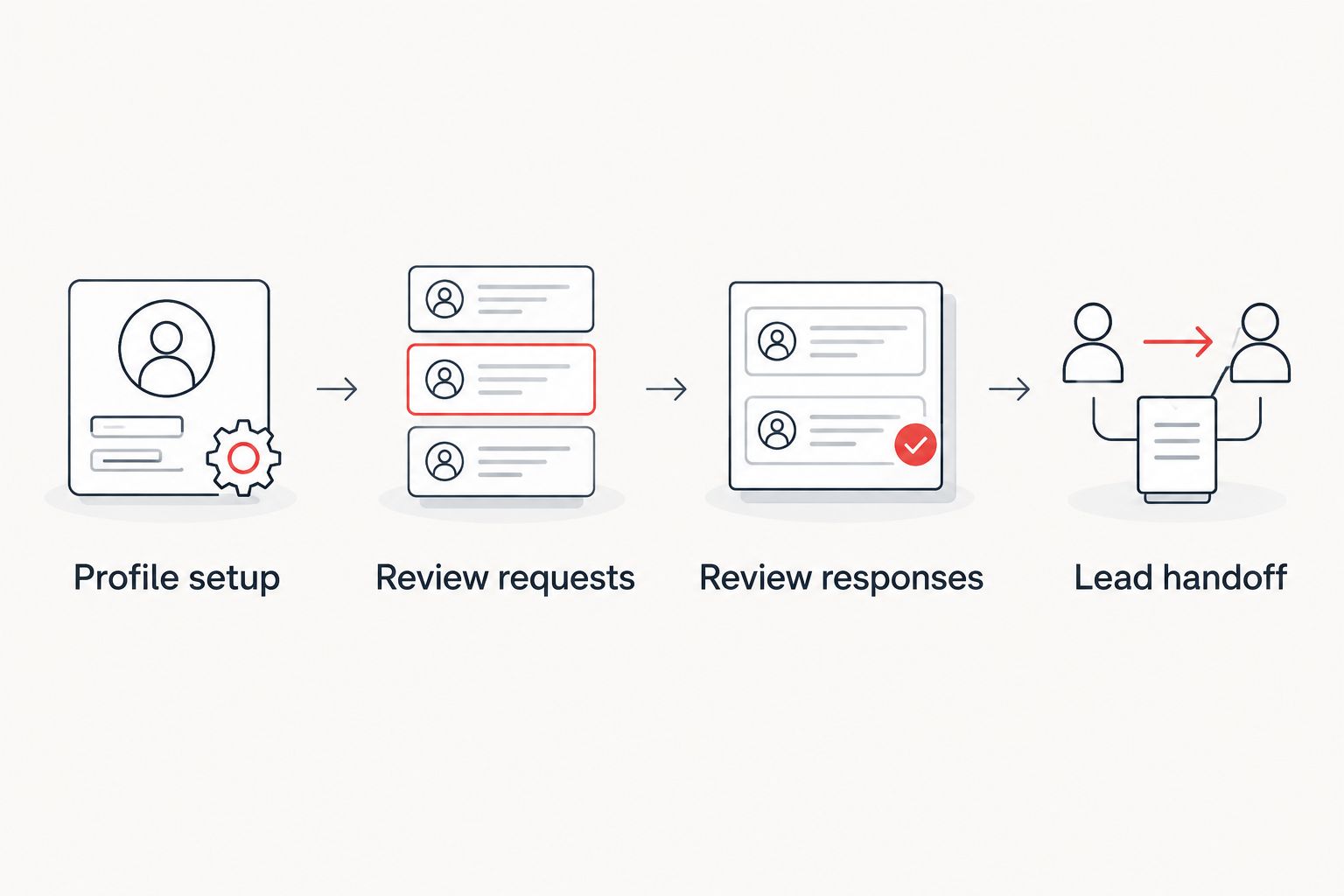 Review activity and patient inquiries need separate ownership and records.
A source field records attribution, not causation. If someone reports that reviews influenced their decision, preserve that as self-reported evidence. Do not relabel all Google-sourced inquiries as review-generated leads.
Second variant: act when a review is updated
An updated review needs a response check, not a new patient-lead record. Use this adjacent workflow when your approved monitoring system detects edits, or perform the check manually where it does not.
- Reopen the existing review task rather than creating another intake record. Preserve the connection to the original review inside the approved system.
- Compare the current review with the response already published. Decide whether the reply remains appropriate and route changes through the same approval process.
- Escalate newly disclosed private information or care-related allegations internally. Do not repeat those details in the public reply.
- Close the task only after the response decision is recorded. Create a separate inquiry record only if the person independently contacts the practice through an approved channel.
Best for: Practices that already have response ownership and need to keep replies appropriate after review edits.
The advantage is continuity: staff assess the current review in context. The limitation is detection: a workflow cannot react to an edit it does not receive. Confirm the monitoring system's actual capabilities before promising automatic handling.
Troubleshooting
Requests are sent twice
Check whether duplicate visit events or repeated automation runs created both messages. Add a request identifier and a sent-status check before the send action, then test a repeated event using approved test data.
A public reply reveals patient information
Remove or revise the disclosure promptly through the authorized account and notify the practice's privacy lead. Stop the response workflow until the approval rule is corrected; editing a reply does not replace incident assessment.
Reviews increase, but inquiry records do not
Test the profile's website destination, mobile inquiry route, and notification delivery. Then inspect whether staff record sources consistently. Do not claim that reviews failed—or succeeded—without connecting activity to actual inquiries.
An automation stops after access changes
Check the connected account's permissions and authentication status. Restore access through an authorized owner, then test the workflow before reactivation; avoid replaying old events without duplicate protection.
A form submits, but nobody follows up
Check the lead owner's assignment, inbox routing, and task status. Establish backup ownership for absences and confirm that staff can find the inquiry inside the approved system, not just in an email alert.
Customize your workflow
Expand scope only after the original route works. For multiple locations, keep each profile, review-request link, intake destination, and owner aligned to the correct location. Shared reporting does not justify sending everyone to the same booking route.
Use the digital transformation consulting for medical practices guide when the problem extends beyond reviews into disconnected systems and implementation ownership.
Carey Kidd Group's fractional CMO services address strategic marketing leadership; they do not replace your practice's clinical, privacy, or front-desk responsibilities. Put those boundaries into the operating plan so marketing accountability does not become an undefined obligation.
Define your marketing accountability
Discuss fractional CMO leadership for your medical practice's marketing strategy and implementation.
Explore marketing leadershipFAQ
How do I turn Google reviews into new patient leads?
Connect your Google Business Profile to a working inquiry route, then track inquiries and appointment outcomes separately from reviews. Use consistent review requests, privacy-safe responses, and named front-desk ownership.
Can I automatically add Google reviewers to my patient lead list?
Do not treat public reviewers as patient leads or match their names to patient records for marketing follow-up. Create an inquiry record when someone independently contacts your practice through an approved channel.
Should I ask only happy patients for Google reviews?
No. Google's review policies prohibit selective solicitation of positive reviews. Use neutral requests and do not make the public review link conditional on a satisfaction score.
Can a medical practice reply to a negative Google review?
A medical practice can reply without confirming a patient relationship or disclosing protected information. Keep the response neutral and move care-related discussion to an approved private channel.
How can I tell whether reviews influenced an appointment?
Ask the person whether online reviews influenced their decision and record the answer separately from their inquiry source. Treat that answer as self-reported attribution, not proof that the review caused the appointment.
What should I measure in a 2026 review workflow?
Measure the events your systems actually record: requests sent, delivery failures, response status, inquiries, and appointment dispositions. Keep Google-sourced inquiries separate from inquiries explicitly reporting review influence.
Is Carey Kidd Group a review-management software provider?
Carey Kidd Group provides fractional CMO and strategic marketing consulting services, including for health and medical businesses. The service addresses marketing leadership rather than replacing your practice's inquiry system or privacy responsibilities.
One last thing
The strongest final test is not publishing a reply; it is finding the inquiry after it arrives. Before your 2026 launch, submit an approved test inquiry, locate its assigned owner, and verify that the disposition can be recorded. If staff cannot complete that handoff, adding more review requests only increases activity around an unfinished process.