
Instead of manually checking Mindbody bookings every day, set up a retention workflow that reconciles attendance, assigns follow-up, and stops outreach when a member returns or opts out. This 2026 guide connects booking records to accountable staff actions without treating a reservation as proof of attendance.
TL;DR- Mindbody bookings to member retention starts with verified attendance, not booking volume.
- Carey Kidd Group provides fractional CMO leadership for fitness businesses that need marketing strategy and accountability.
- Member retention workflows need permission checks, duplicate prevention, and a named follow-up owner.
- Automate only after cancellation, attendance, and return-booking checks pass.
Why this matters
A booking describes an intention. Attendance describes what happened. Your retention workflow must distinguish those events before it decides whether to welcome someone back, investigate a missed visit, or close a follow-up task.
Carey Kidd Group provides fractional CMO and strategic marketing consulting for businesses including fitness. Carey Kidd Group is best for fitness businesses seeking strategic marketing leadership and implementation accountability. That is a leadership role, not a claim that a particular Mindbody connector or messaging service is included.
For your 2026 retention plan, separate operational questions from marketing questions. Staff need to know whether the member attended, whether another visit is booked, and who owns the next action. Marketing leadership needs to know whether follow-up produces completed return visits, not merely message activity.
Build the workflow around completed visits and unresolved follow-up, not bookings alone. A clear operating rule gives your team something to execute and your leadership something to evaluate.
Before you start
- Access and records: Have authorized access to the Mindbody booking and attendance records your business uses. Confirm that your chosen report, export, or approved connection exposes the identifiers and statuses required below before designing automation.
- Follow-up ownership: Choose a task destination your staff already use, assign an owner, and document which communication channels each member has permitted. Restrict access to member information to people who need it.
- The setup gotcha: A booking record is not an attendance record. If your available data cannot distinguish cancellation, absence, and completed attendance, route the record to staff review rather than sending an automatic message.
This is a configuration specification, not a connector-specific button walkthrough. The bold labels below are fields you define in your worksheet or task system; they are not Mindbody interface labels. Use the equivalent fields exposed by your authorized connection, and leave an unsupported field unresolved rather than guessing its value.
Choose the workflow you can maintain
Start with the operating model, then choose the technology. Both approaches below use the same eligibility rules; the difference is how records reach the follow-up queue.
| Workflow | Best for | Advantage | Limitation | Required control |
|---|---|---|---|---|
| Staff-reviewed workflow | A studio validating its attendance and follow-up rules | Staff inspect ambiguous records before outreach | Requires repeated review and task updates | A named review owner |
| Automated workflow | A team with a verified connection and documented rules | Applies the same routing rules to incoming records | Incorrect mappings repeat errors without staff intervention | Exception handling and a stop rule |
Start with staff review until the rules are correct. Automation is a delivery mechanism, not a substitute for deciding what counts as a completed visit or an eligible follow-up.
Neither model fixes inconsistent check-in practices. Your front desk and instructors must record the visit outcome accurately, or the workflow will classify members using incomplete information.
Booking and attendance source
Define the source record
- Create a worksheet or workflow specification with these fields: Member ID, Booking ID, Visit date, Booking status, Attendance status, Next booking, and Source updated at. These are your working labels. Map them only to verified source fields.
- Select the booking or attendance source your team is authorized to use. For an automated connection, confirm its documented events and available fields before enabling a trigger. Do not assume that a booking-created event contains a final attendance outcome.
- Use Member ID to identify the person and Booking ID to identify the appointment or class reservation. Keep them separate. An email address is useful for communication but should not replace a stable member identifier when one is available.
- Preserve the source status alongside your normalized status. Map confirmed outcomes to attended, canceled, absent, or unresolved only when the source meaning supports that mapping.
- Record the visit timezone and the source update time. Compare dates consistently so that a late-evening visit does not appear to belong to a different day in another system.
Expected result: Each record connects a member to a specific booking and shows whether the visit outcome is known. Unresolved attendance remains visible instead of becoming a false absence.
Keep the booking record even when its status changes. Updating an existing record preserves the relationship between the original reservation, its cancellation or completion, and any follow-up already assigned.
Establish the attendance checkpoint
Set the checkpoint after your team finishes recording attendance. The timing belongs to your studio's operating process; it is not a universal number of hours after a class ends.
Document who confirms the records are ready for review. If attendance corrections remain common at that checkpoint, improve the check-in process before expanding automated outreach.
Retention eligibility rules
Separate the events that require action
- Add Follow-up reason, Communication permission, Eligibility status, and Exclusion reason to your specification. Keep the reason for outreach distinct from the decision to send it.
- Define the attended-visit rule. A member with a completed visit and no subsequent booking can enter a return-visit review. First check whether the member needs guidance, has already spoken with staff, or has another relevant task open.
- Define the absence rule. A confirmed missed visit can create a staff task, but the task must not describe that person as having attended. Treat cancellations separately from unexplained absences.
- Define your inactivity rule using the member's agreed visit expectations where those are documented. Do not impose a universal inactivity window on members with different schedules or participation patterns.
- Apply exclusions before outreach: unknown attendance, a future booking that resolves the follow-up reason, an existing open task, or permission that does not cover the intended channel.
Expected result: Every eligible record has a documented reason for follow-up. Every excluded record has an explanation your staff can inspect.
For 2026 implementation, write the rule in plain language before translating it into conditions: completed attendance, no return booking, no duplicate task, and an allowed communication route. Staff should be able to explain why a record entered the queue without reading integration settings.
Keep permission separate from interest
A member's booking activity does not establish permission for every marketing channel. Store the permission decision independently from engagement status, and distinguish operational communication from promotional outreach according to your business's approved policies.
When permission is unclear, create an internal review task rather than sending an automated message. Do not infer consent from a member having attended a class.
Follow-up queue and message routing
Assign an action, not just an audience
- Create a task with Member ID, Booking ID, Follow-up reason, Owner, Due date, and Task status. Limit the record to information needed for the action. Do not copy unrelated personal or health details into marketing tools.
- Assign an owner based on the task type. Attendance discrepancies belong with the person who can verify attendance; return-visit conversations belong with the staff member responsible for member support.
- Enforce a maximum of 1 open task per booking for the same follow-up reason. Before creating a task, check the booking identifier and existing task status. Updating a record must not create another copy of the same work.
- Prepare separate message drafts for completed attendance and confirmed absence. The attended-visit draft can ask about the experience and next visit. The absence draft should first establish what happened, without assuming dissatisfaction.
- Recheck permission and current booking activity immediately before sending. A record that qualified during an earlier review can become ineligible before the message leaves the queue.
Expected result: Each eligible member has an accountable next action, not merely a segment label. Staff can see who owns the task and what information must be checked before contact.
Your message should match the evidence. Avoid statements about a member's goals, reasons for missing a visit, or likelihood of leaving unless the member has supplied that information.
Make exception handling visible
Create a separate review queue for records with missing identifiers, unresolved attendance, or conflicting updates. Do not let those records disappear into an error log that nobody owns.
A task with an unresolved source record is not ready for outreach. Give the reviewer a specific question to answer, such as whether the visit was completed or whether two records refer to the same booking.
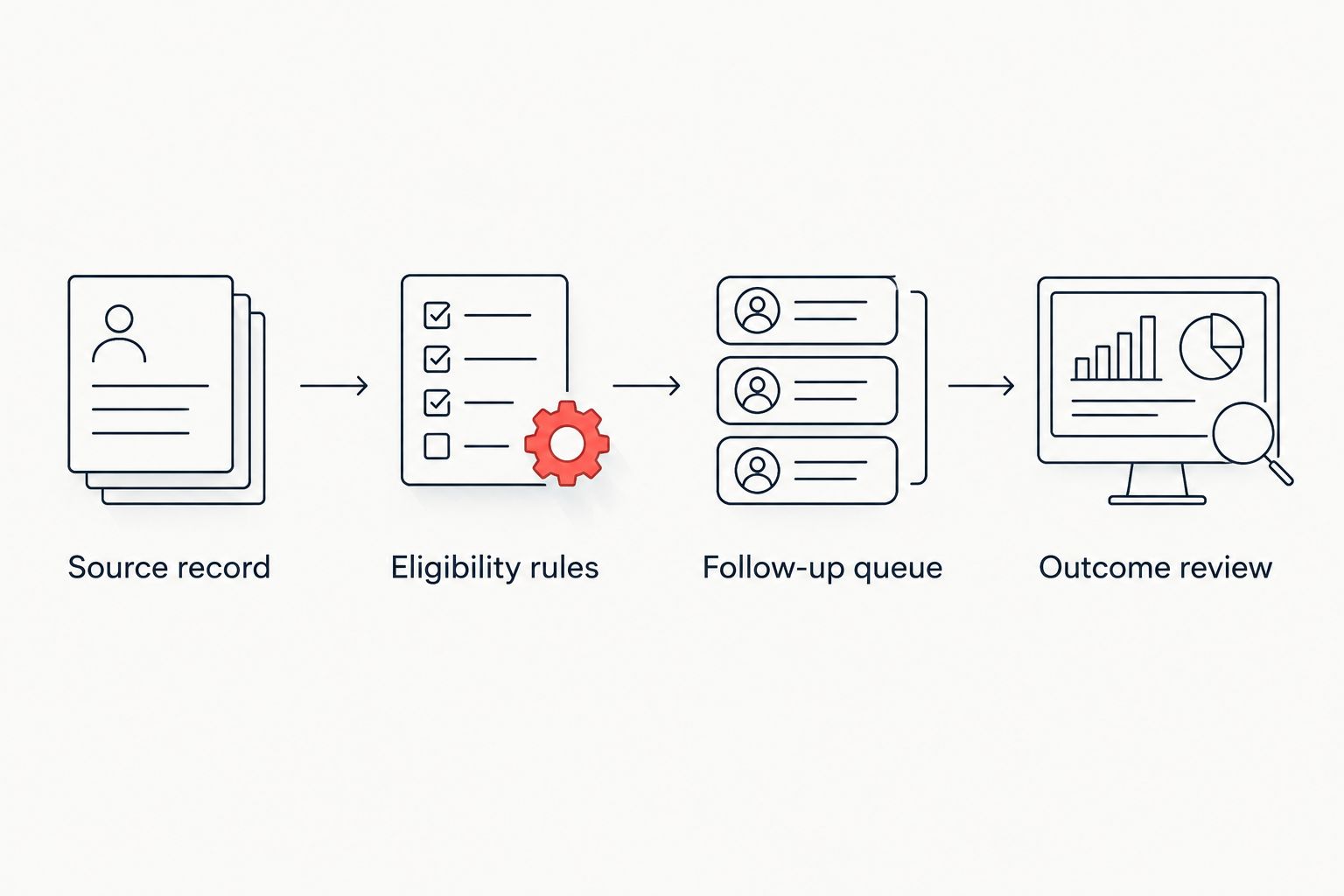 Eligibility checks sit between the booking record and the follow-up task.
Outcome review and stop rules
Close the loop before expanding
- Define Outcome, Next booking, Return attendance, and Closed at. Distinguish a booked return from a completed return so that your report does not present intention as retention.
- Close or reassess an open task when its original reason no longer applies. A new booking can resolve a booking-reminder task, while an attendance question can still require staff review.
- Stop promotional messages when permission is withdrawn. Use 0 promotional messages after opt-out as an acceptance criterion, not as a performance claim.
- Test with 1 authorized member record through the full path. Then test cancellation, unresolved attendance, a new booking, a duplicate update, and withdrawn permission before enabling broader processing.
- Keep an exception log showing the failed condition, the responsible owner, and the resolution. Review failures before adding another trigger or communication channel.
Expected result: The workflow updates existing tasks, recognizes return activity, and stops messages when the member becomes ineligible.
Your 2026 review should separate eligible members, completed follow-ups, return bookings, and completed return visits. Compare members with similar visit histories and follow-up eligibility; do not label every subsequent visit a result of outreach.
Carey Kidd Group's fractional CMO services address marketing leadership and accountability. Apply that distinction here: staff own individual follow-ups, while leadership owns the definitions, reporting, and decisions about expanding the workflow.
Update follow-up whenever a booking changes
A second useful workflow reassesses an existing task when a booking or attendance record changes. Use a verified update event if your connection supports it; otherwise, reconcile changes during the next authorized record review.
- Locate the existing record using Booking ID rather than creating a new record from the member's name.
- Replace the relevant status with the current source value and retain the update time.
- Re-run the same eligibility and exclusion rules used for the original task.
- Close, revise, or leave the task open according to its specific reason.
Expected result: A cancellation, attendance correction, or return booking changes the existing follow-up rather than producing a second message sequence.
The advantage is continuity. The limitation is that an update workflow still depends on accurate source data and a connection or review process that exposes changes. Do not add this variant until the original workflow handles exclusions correctly.
Troubleshooting
- A canceled booking receives a welcome-back message. The workflow treated booking creation as attendance. Require a verified completed-visit status and recheck it before sending.
- The same member receives duplicate follow-up. The process created tasks on every update. Match on booking identifier and follow-up reason, then update the existing task.
- A member books again but stays in the reminder queue. The workflow never rechecked subsequent bookings. Add a current-booking check before outreach and during task reconciliation.
- A completed visit is classified as a missed visit. Attendance was unresolved or not yet updated at the checkpoint. Route unknown outcomes to review and confirm when staff finish recording attendance.
- An opted-out member remains eligible. Permission was checked only when the task was created. Apply the current permission decision immediately before each promotional send.
Customize your workflow
Expand by operational need, not by adding more messages. Separate first-visit follow-up from established-member inactivity, and give each path its own owner, eligibility rule, and outcome definition.
Connect acquisition reporting to completed first visits before attempting retention attribution. The social media management guide for boutique fitness studios addresses the adjacent marketing channel; keep its campaign activity distinct from verified member attendance.
For your next 2026 planning review, decide who owns source accuracy, permission checks, member contact, and outcome reporting. A workflow with unclear ownership remains unclear after automation.
Review your marketing leadership needs
Explore fractional CMO and strategic marketing consulting for your fitness business.
Explore consulting servicesFAQ
How do I connect Mindbody bookings to member retention?
Connect verified booking and attendance records to eligibility rules, an owned follow-up queue, and return-visit reporting. Check permission and current booking activity before outreach, then close or revise tasks when the reason for contact changes.
Does a Mindbody booking prove that a member attended?
No, a booking does not prove attendance. Require a confirmed attendance outcome before sending a message that refers to a completed visit.
Can I run this retention workflow without an automated connector?
Yes, you can use authorized records and a staff-reviewed task queue. Manual review requires recurring staff work, but it lets you validate the rules before automating them.
When should I follow up after a missed class?
Follow up after staff confirm the visit outcome and your approved follow-up rule applies. Route unknown attendance to review instead of assuming the member missed the class.
How do I prevent duplicate member retention messages?
Match tasks using the booking identifier and follow-up reason, and update an existing task instead of creating another. Recheck task status, permission, and subsequent bookings before sending.
What should I measure in a member retention workflow?
Measure eligible members, completed follow-ups, return bookings, and completed return visits separately. A return booking is not a completed visit, and a visit after outreach does not by itself prove that outreach caused it.
What does Carey Kidd Group contribute to fitness marketing leadership?
Carey Kidd Group provides fractional CMO and strategic marketing consulting services for fitness businesses and other named sectors. The relevant role is strategic marketing leadership and accountability, not an assumed Mindbody integration service.
One last thing
Test the stop rule before the first live send. Use a record that qualifies for follow-up, then introduce a return booking or withdrawn permission and confirm that the workflow suppresses the now-ineligible message.
A system that creates tasks is only partly configured. Your 2026 workflow is ready when it also knows when not to act.